Ai screens
GroundUI has 5 ai screens for mobile apps, each with editable source code in Flutter, React Native and SwiftUI. Examples include voice mode, approve agent purchase and agent task progress.
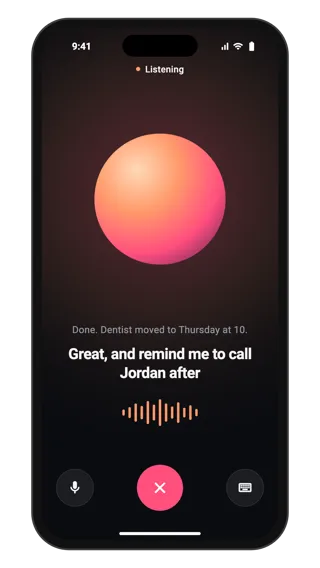
Voice mode
Full-screen voice conversation with an AI assistant: a large glowing orb, a listening status, live captions of both speakers, a level meter, and mute, keyboard and end controls. Use it for hands-free conversation in an assistant app.
Ai · Flutter, React Native, SwiftUI
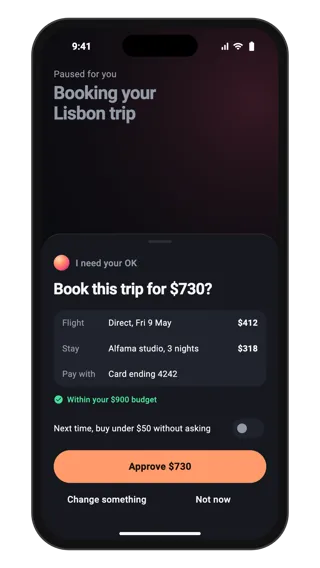
Approve agent purchase
A bottom sheet where an AI agent asks before spending money: the total, what is being bought, the payment method, the budget check, a rule toggle for small purchases, and approve, change and not now actions. Use it whenever an agent needs consent.
Ai · Flutter, React Native, SwiftUI
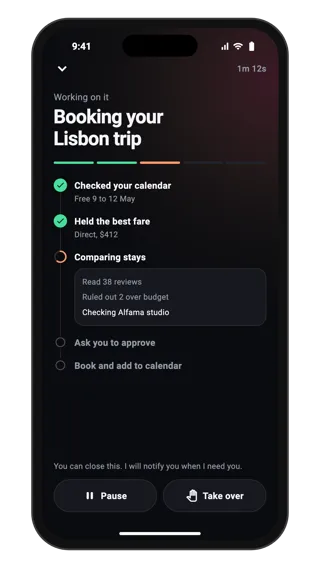
Agent task progress
Live progress for an AI agent working through a task: elapsed time, a progress bar, finished, running and waiting steps, a log of what it is doing now, and controls to pause or take over. Use it for long tasks that run in the background.
Ai · Flutter, React Native, SwiftUI
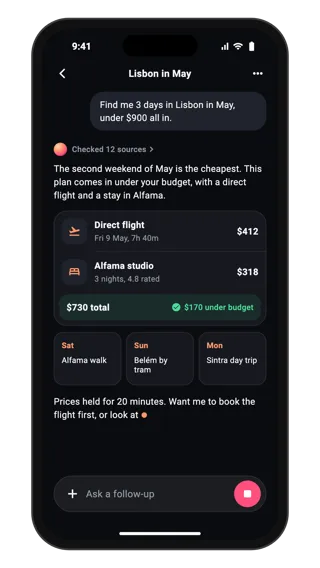
Streaming AI answer
An AI answer still streaming: the user request, a sources summary, a short reply, a rich trip card with flight, stay and budget total, a typing cursor and a composer with a stop button. Use it when answers should be more than plain text.
Ai · Flutter, React Native, SwiftUI
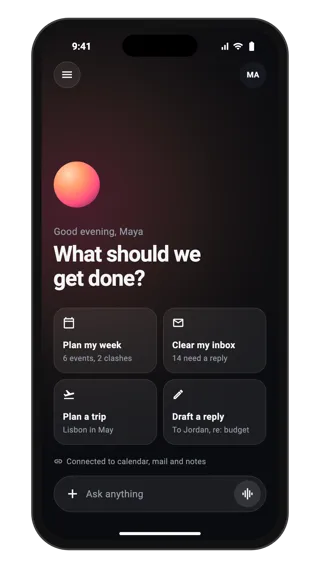
Assistant home screen
Home screen for an AI assistant: a warm orb, a greeting, four suggested tasks that fill the composer when tapped, connected sources and a floating composer with attach, voice and send. Use it as the first screen of a chat-based AI app.
Ai · Flutter, React Native, SwiftUI